
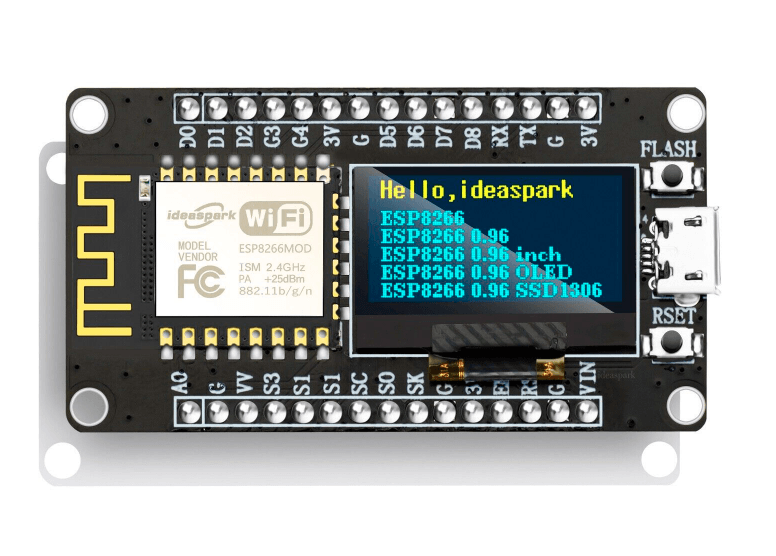
NodeMCU ESP8266 Development Board with 0.96 Inch OLED Display, CH340 Driver Module for Arduino IDE/Micropython Programming COM52, R37
DescriptionThis circuit board integrates the ESP8266 NodeMCU and 0.96-inch OLED screen, providing all the functions of traditional ESP8266 modules, with the same size and peripheral ports, as well as higher performance development tools and high-definition data display. It supports multiple programming modes and has an ESP8266 chip with an 80MHz main frequency and 4MB flash memory, making it easy to handle various tasks and applications, as well as a complete network protocol stack and security mechanism. It has low power consumption and high performance, making it suitable for beginners and professionals to develop and apply IoT projects. FeaturesAll-in-One DesignHassle-Free IntegrationVersatile DisplayHigh-Resolution Display (128×64)USB-C interface for your projects connectable Specifications NodemcuWorking Voltage: 3.3VInput Voltage: 7-12VDigital I/O Pins: 16Analog Input Pin: 1UART: 1SPI: 1I2Cs: 1Driver: CH340GFlash Memory: 4 MBSRAM: 64 KBClock Speed: 80 MHZ ESP8266 and OLED Port MappingESP8266 ———- 0.96” OLEDVCC(3.3V) ———- VCCGND —————- GNDD6(GPIO12) ——– SDAD5(GPIO14) ——– SCL Getting started with NodeMCU ESP8266 with 0.96 Inch OLED Display Let’s first take a look at the pinout of the device Now we upload a sample code to check if our board is safe and sound, since the only difference from the usual NodeMCU ESP8266 things are gonna be just easy. No complications. As the following picture illustrates, you have first to download the board index of Nodemcu ESP8266 and the supporting driver for it in order to interface it with your computer arduino IDE Next you install the library for the OLED attached on the Nodemcu to be able to print whatever you like on it. So follow the steps in the picture below
Share on: