


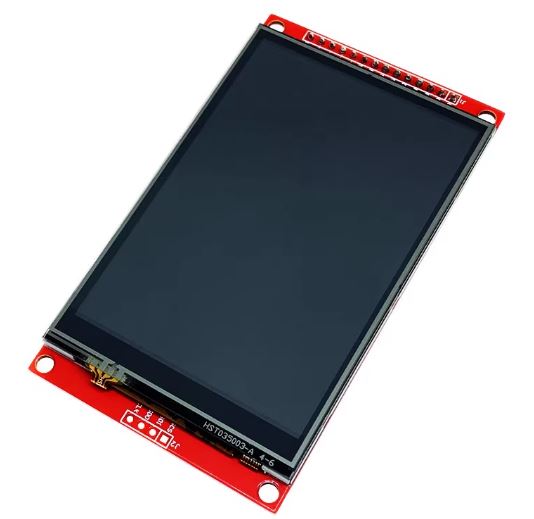
3.5 inch SPI TFT Display Module Touch Screen ILI9488 /6 /1 Driver 320X480 COM52 R36
Description3.5-inch color screen, supports 65K color display, rich display colors480X320 HD resolution, optional touch functionUsing SPI serial bus, only a few IOs are needed to light up the displayWith SD card slot for convenient expansion experimentsProvide rich sample programsMilitary-grade process standards, long-term stable workProvide underlying driver technical supportProduct DescriptionNameParametersize3.5(inch)TYPETFTDriver chipILI9488-9486-9481Resolution480*320 (PIXEL)Module interface4-WIRE SPI interfaceEffective display area (AA area)48.96×73.44(mm)Module PCB backplane dimensions55.1×96.18(mm)Touch typeOptional resistance touchVCC IO port voltage3.3v~5vPower consumptionAbout 90MaLogic IO port voltage3.3v(TTL)3.5″ TFT Touch Screen with DOIT ESP32 DEVKIT V1Hardware Required:Esp32 DevKit V1 with USB cable2 mini BreadboardsJumper wiresLED220 Ohm LED protecting resistor1. Pin ConnectionSerial numberLabelPin description➡️ESP321VCC (VDD)Power input (3.3v-5v)➡️3.3V2GNDI power ground➡️GND3CSLCD chip select➡️GPIO154RESET (RST)LCD reset➡️GPIO45DCLCD bus command/data selection➡️GPIO26SDI (MOSI)LCD SPI display bus data input➡️GPIO237SCKI LCD SPI display bus clock signal➡️GPIO188LED (BL)LCD backlight control (high level lights up)➡️3.3V9SDO (MISO)LCD SPI display bus data input and output➡️GPIO1910T CLKTouch panel SPI bus clock signal➡️GPIO2611T CSTouch panel SPI bus chip select➡️GPIO2512T DINTouch panel SPI bus data input➡️GPIO3313T DOTouch panel SPI bus output➡️GPIO3214IRQ (PEN)Touch panel interrupt IRQ signal➡️GPIO352. Library UsedTFT_eSPIXPT2046_Touchscreen3. Changes Made in User_Setup.h file of TFT_eSPI libraryAfter adding TFT_eSPI library to your IDE, you will need to make some modifications to User_Setup.h file to make everything work. In this repository, there is a copy of User_Setup.h with modifications. The following are some modification made to the file:Defining driver [one to be defined the other ones must be commented out] (line 45-64)// #define ILI9341_DRIVER // Generic driver for common displays ... #define ILI9488_DRIVER // WARNING: Do not connect ILI9488 display SDO to MISO if other devices share the SPI bus (TFT SDO does NOT tristate when CS is high) ...Defining the pins that are used to interface with the display here (line 112)Comment out ESP8266 NodeMCU pins and uncomment ESP32 pins#define TFT_MISO 19 #define TFT_MOSI 23 #define TFT_SCLK 18 #define TFT_CS 15 // Chip select control pin #define TFT_DC 2 // Data Command control pin #define TFT_RST 4 // Reset pin (could connect to RST pin) //#define TFT_RST -1 // Set TFT_RST to -1 if display RESET is connected to ESP32 board RST ... #define TOUCH_CS 21 // Chip select pin (T_CS) of touch screen ...Define the ESP32 SPI port to use (line 374)As we are using Virtual SPI (VSPI) port, we need to uncomment this line #define USE_HSPI_PORT4. CalibrationWith the Touch_Calibration sketch, the min/max values (TS_MINX, TS_MAXX, TS_MINY, TS_MAXY) will be available in the serial monitor for direct use in your touchscreen mapping logic.In you sketch you will need to replace these values with the one you have got:#define TS_MINX 200 #define TS_MAXX 3700 #define TS_MINY 240 #define TS_MAXY 3800Note: This is tested on ILI9488_DRIVER. If you have different type, update the User_Setup.h file5. On/Off Button ExampleThe On/Off Button Example is designed to toggle an LED connected to pin 12. However, you might encounter a “flipping” issue, where the touch input does not align with the location of the desired effect on the screen. This issue arises because the raw touchscreen coordinates do not correspond directly to the screen’s orientation or dimensions. To resolve this, calibration is required to map the raw touch coordinates accurately to the display area, accounting for any flipping or mismatches.Here are some key areas you may change in your codesScreen dimensions... #define SCREEN_WIDTH 320 #define SCREEN_HEIGHT 480 ...Screen rotationtouchscreen.setRotation(0); // Match screen rotation ... tft.setRotation(0); // Portrait orientation ...Mapping raw touch coordinates to screen coordinates... int touchX = map(p.x, TS_MAXX, TS_MINX, 0, SCREEN_WIDTH); int touchY = map(p.y, TS_MINY, TS_MAXY, 0, SCREEN_HEIGHT); ...powered by Advanced iFrameUpload the codes into your board and you will be getting the same screen as shown below:
Share on: