

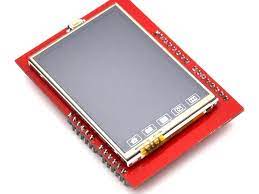
2.4″ TFT LCD Shield Touch Panel Module TF Micro SD For Arduino UNO R3 DISP32 , R23
DescriptionThis is TFT touchscreen LCD display which is used to interface with arduino and can show image.Features:1. 2.4″ diagonal LCD TFT display 2. Bright, 4 white-LED backlight, on by default but you can connect the transistor to a digital pin for backlight control 3. Colorful, 18-bit 262,000 different shades 4. 4-wire resistive touch screen 5. 8 bit digital interface, plus 4 control lines 6. Uses digital pins 5-13 and analog 0-3. That means you can use digital pins 2, 3 and analog 4 and 5. Pin 12 is available if not using the micro SD 7. 5V compatible, use with 3.3V or 5V logic 8. For Arduino UNO R3 9.Resolution: 240X320 10.Driver IC: ILI9341Getting started with the 2.4″ TFT LCD Shield Touch Panel Module TF Micro SD Arduino has always helped to build projects easily and make them look more attractive. Programming an LCD screen with touch screen option might sound as a complicated task, but the Arduino libraries and shields had made it really easy. In this project we will use a 2.4” Arduino TFT LCD screen to build our own Arduino Touch Screen calculator that could perform all basic calculations like Addition, Subtraction, Division and Multiplication.Hardware requiredArduino uno2.4″ TFT LCD Shield Touch Panel Module TF Micro SDConnecting the HardwareBegin by carefully starting the rear connector of the TFT shield onto the Arduino uno. Go slowly and ensure that all pins are inserted correctly and are straight.Setting up the libraryIn order to use 2.4″ TFT lcd Shield , We must have the libraries. So you can downloadMCUFRIEND_kbvAdafruit_GFXUpload the sample sketch
Share on: